Do You Really Need a VPN? Home vs. Public Wi-Fi
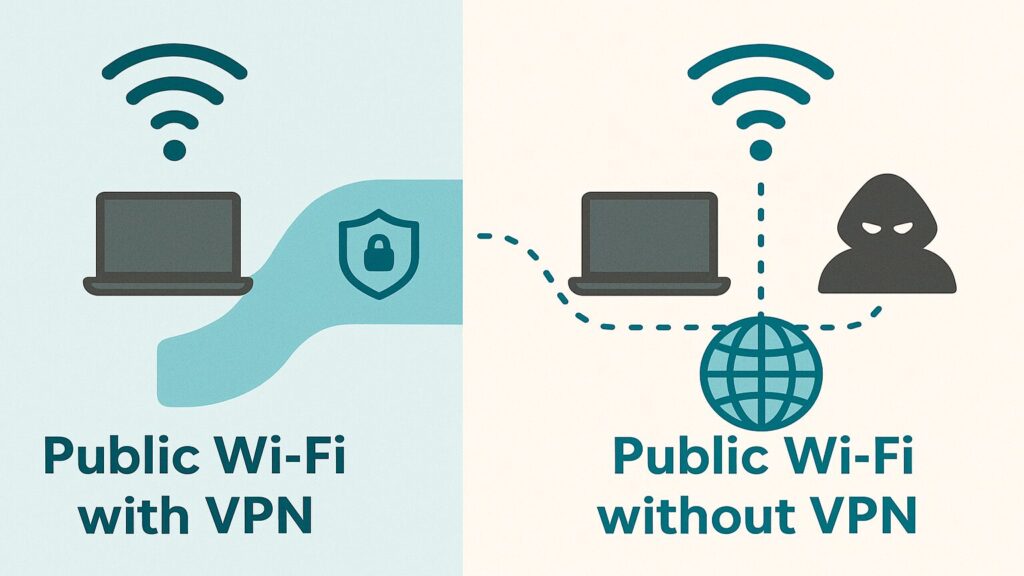
If you have spent any time online lately, you have probably seen ads insisting that a VPN is the ultimate shield for your privacy and security, and that you are practically reckless without one. VPNs are genuinely useful tools, especially when you are out and about, but the marketing tends to oversell them. So if you are wondering whether you actually need a VPN, the honest answer is the one no advertisement will give you: it depends. Let us cut through the noise and look at when a VPN truly helps, when it is overkill, and how to decide for yourself.
Quick takeaway: Use a VPN when you are on a network you do not control, like public Wi-Fi at a cafe, airport, or hotel, or when you need secure remote access to work or home resources. On your own properly secured home or small-business network, a VPN running all the time is usually unnecessary. It is a helpful tool, not a substitute for good security habits.
What This Means in Plain English
A VPN, or Virtual Private Network, creates a secure, encrypted tunnel between your device and the internet. It routes your traffic through a private server, hiding your real IP address and shielding your data from anyone trying to peek along the way.
Here is an analogy. Using the internet without a VPN is a bit like driving on a public road: anyone sitting alongside it can see where you are going, when you left, and how often you visit certain places. A VPN is like putting your car in a private tunnel. It does not change your destination, but it hides your route from onlookers. That privacy is valuable in some situations and barely matters in others, which is the whole reason “do you need a VPN” does not have a one-size-fits-all answer.
VPN vs. Wi-Fi: What’s the Difference?
A lot of people ask about a VPN and Wi-Fi as if they were competing choices, but they do two completely different jobs. Wi-Fi is how your device connects to the internet — the wireless link between your phone or laptop and your router. A VPN is a privacy layer that rides on top of whatever connection you already have, whether that is Wi-Fi, a wired cable, or cellular data. One gets you online; the other keeps what you do online private.
So the honest answer to “what is the difference between a VPN and Wi-Fi” is that they are not alternatives at all — you can use both, one, or neither depending on where you are. The question that actually matters is not “VPN or Wi-Fi,” but whose network am I on? On your own secured home Wi-Fi, the encryption and firewall are already doing much of the work, so a VPN is optional. The moment you hop onto public Wi-Fi you do not control, a VPN is the layer that closes the gap.
What a VPN Actually Protects
When a VPN is the right tool, it does a few things genuinely well:
- It secures you on public Wi-Fi. On shared networks at coffee shops, airports, and hotels, others could potentially snoop on your activity. A VPN encrypts everything, like whispering through noise-canceling headphones so only the right person hears you.
- It hides your IP address and location. Your IP reveals your general location to websites and advertisers. A VPN swaps it for the server’s address, making you harder to track and, as a bonus, able to appear in a different region.
- It keeps your browsing private from your internet provider. Even at home, your ISP can see the sites you visit. A VPN encrypts that traffic before they ever see it, so they cannot build a profile of your habits.
- It connects you to home or work resources remotely. Businesses use VPNs so remote staff can reach internal servers as if they were in the office, and home users can tap into media servers, cameras, or smart-home tools while traveling.
When You Probably Do Not Need One at Home
On a network you own and control, a VPN is often overkill, because you already have several layers of protection working quietly in the background:
- Your Wi-Fi is already encrypted if you are using WPA2 or WPA3 with a strong password.
- Your router acts as a firewall, shielding your devices from most outside threats.
- Most websites now use HTTPS, which encrypts your connection to them even without a VPN.
If your goal is everyday online safety and you already use strong passphrases, multi-factor authentication, and a secure browser, you are likely just fine without a VPN running on your home network around the clock.
Where VPNs Fall Short
VPNs are powerful, but they are not magic, and it helps to know their limits:
- They can slow your connection, especially when the server is far away.
- They can break some apps and sites, since certain banks and streaming services block VPN traffic.
- They can create a false sense of invincibility. A VPN does nothing to stop viruses, phishing emails, or weak passwords. It protects your connection, not your judgment.
So, Do You Need a VPN?
Here is the simple way to decide, based on whether you control the network you are on. At a glance:
| Your situation | Use a VPN? | Why |
|---|---|---|
| Public Wi-Fi (cafe, airport, store, hotel) | Yes | Encrypts your data so others on the network cannot snoop |
| Secured home Wi-Fi (WPA2 or WPA3) | Not needed | Your router and HTTPS already do the job |
| Work Wi-Fi you manage and trust | Not needed | Trusted, controlled network |
| Working remotely | Yes | Secure access to business resources |
| Traveling, especially internationally | Yes | Privacy and access to your usual content |
| Privacy from your internet provider | Optional | Blocks your ISP from tracking your browsing |
Reach for a VPN When
- You are on public Wi-Fi at a cafe, airport, store, or hotel.
- You are working remotely and need secure access to business resources.
- You are traveling, especially internationally, and want privacy or access to your usual content.
- You specifically want to keep your browsing private from your internet provider.
You Can Usually Skip It When
- You are on your secured home Wi-Fi using WPA2 or WPA3 and a strong password.
- You are on a work network you manage and trust.
- Your main concern is general safety and you are already using HTTPS sites, strong passphrases, and multi-factor authentication.
Ronin Tip: You do not have to choose “always on” or “never.” Many people keep a reputable VPN app installed and switch it on only when they hop onto public Wi-Fi or travel. That gives you protection exactly when it matters without the daily speed tax at home.
What You Can Do Today
- Secure your home network first: Confirm your router uses WPA2 or WPA3 and a strong Wi-Fi password. That covers most of what a home VPN would.
- Install a trusted VPN for travel: Choose a reputable paid provider and turn it on when you use public Wi-Fi or leave town.
- Skip the hype: Do not buy a VPN just because an ad implied your life is in danger without one. Match the tool to your actual situation.
- Layer your basics: Strong passphrases and multi-factor authentication protect you in ways a VPN never can.
- Ask before a big trip: If you will rely on public Wi-Fi for work, set up and test your VPN before you go.
When to Get Help
Choosing a trustworthy VPN, setting up secure remote access to your business, or just confirming your home network is properly locked down can be confusing, and the wrong VPN can be worse than none at all. If you would like a second opinion or a hand getting it configured, a trusted local tech can point you to a reputable option and make sure it is set up to actually help.
The Bottom Line
A VPN is a tool, not a cure-all. It shines when you are on networks you do not control, like public Wi-Fi and hotel internet, and when you need secure remote access. On your own secured home or business network, you probably do not need one running all the time. Use a VPN when it makes sense for your situation, lean on strong passphrases and multi-factor authentication for everything else, and ignore the ads telling you the sky is falling. That balanced approach will keep you both safe and sane.
Want a Hand From a Local Tech?
If you would rather have someone help you choose or set this up, that is what we do. Technology Ronin offers friendly home IT & tech support for homes and small businesses in the Denver metro and surrounding areas, onsite or remote. We can recommend a trustworthy VPN, set up secure remote access for your business, and make sure your home network is properly protected.
Quick Questions
Do I need a VPN at home?
Usually not, if your home Wi-Fi uses WPA2 or WPA3 with a strong password. Your router and HTTPS already protect most of your activity. A VPN matters most on networks you do not control.
What’s the difference between a VPN and Wi-Fi?
They are not the same thing, and they are not competing choices. Wi-Fi is how your device connects to the internet; a VPN is a privacy layer that encrypts that connection no matter how you got online. You can use both at once — Wi-Fi to connect, and a VPN to keep the connection private on networks you do not control.
Is a free VPN good enough?
Be cautious. Some free VPNs make money by logging or selling your data, which defeats the purpose. For real privacy, a reputable paid provider is usually the safer choice.
Does a VPN protect me from viruses and scams?
No. A VPN secures your connection but does nothing against malware, phishing, or weak passwords. Pair it with good habits and multi-factor authentication.
Helpful Resources
For readers who want to learn more, these trusted resources are a good place to start:
Need a hand securing your setup? Technology Ronin helps homes get Wi-Fi, devices and VPNs configured the right way — see our home IT services. Running a business? Our small business IT support covers secure networks, VPNs and everyday computer support across the Denver metro.